Introduction
As video editing becomes more demanding in 2026—driven by higher-resolution content, multi-platform publishing, and faster turnaround expectations—traditional mouse-and-keyboard workflows are no longer enough for many creators. Editors now rely on dedicated control surfaces, also known as video editing consoles, to speed up timeline navigation, color grading, trimming, and multi-layer adjustments.
This guide compares different types of video editing consoles available today and explains why the XPPen Pilot Pro stands out as a strong choice for modern editing workflows. We’ll also explore other popular options, including TourBox Elite, Logitech MX Creative Console, and Loupedeck, so you can choose the right tool based on your editing style, software needs, and budget.
What to Look for in the Best Video Editing Console
Choosing the right editing console is not just about features—it’s about how naturally the device integrates into your creative workflow. Below are the most important factors to consider before making a decision.
See also: How Architects Bring Your Vision to Life
1. Control Precision and Input Variety
A good video editing console should offer multiple input methods such as dials, knobs, sliders, buttons, and joysticks. These controls allow you to fine-tune color grading, playback speed, and timeline scrubbing with greater accuracy than a mouse.
2. Customization Flexibility
Every editor has a unique workflow. The best consoles allow full customization of buttons and shortcuts so you can map frequently used commands from software like Adobe Premiere Pro, DaVinci Resolve, Final Cut Pro, or After Effects.
3. Ergonomics and Comfort
Long editing sessions require comfortable hardware. Devices should reduce hand movement, minimize strain, and support one-handed operation whenever possible. Ergonomic layouts significantly improve productivity over time.
4. Software Compatibility
A strong editing console should seamlessly integrate with major editing platforms. Without proper plugin support or driver stability, even the best hardware becomes frustrating to use.
5. Build Quality and Responsiveness
Tactile feedback, durability, and low-latency response are essential. Editors rely on precise adjustments, so lag or poor build quality can break workflow efficiency.
6. Learning Curve and Ease of Use
Some consoles are plug-and-play, while others require setup and customization. Beginners may prefer intuitive systems, while professionals might value deep customization even if it takes longer to configure.
7. Workflow Specialization
Different consoles are optimized for different tasks—some are better for color grading, others for timeline editing or general productivity. Choosing one depends heavily on your editing focus.
Best Video Editing Consoles at a Glance
| Rank | Product | Key Strength | Best For |
| No.1 | XPPen Pilot Pro Editing Console | Combines customizable buttons, all-way joystick, high-speed precision dials, and haptic feedback to deliver highly responsive tactile control. It supports deep shortcut mapping and multi-layer workflow control, making timeline navigation, trimming, and parameter adjustments significantly faster and more intuitive. | Professional video editors, content creators, motion designers, and users who need high-speed, precision-driven editing workflows across Premiere Pro, DaVinci Resolve, and After Effects |
| Rank | Product | Key Strength | Best For |
| No.2 | TourBox Elite | Compact one-hand control system designed for shortcut-heavy workflows. It features highly customizable buttons, knobs, and scroll wheels that allow fast switching between tools, making it ideal for detailed editing tasks and repetitive operations. Its strength lies in building muscle memory for efficient long-term use. | Mobile editors, photo/video hybrid creators, and users who work across Adobe Lightroom, Photoshop, and Premiere Pro and need a portable control solution |
| No.3 | Logitech MX Creative Console | Focuses on streamlined productivity and ecosystem integration. It offers intuitive dial-based control and customizable shortcuts with a clean interface designed to simplify creative workflows. It is especially strong in cross-device control and general creative task management rather than deep timeline editing. | Content creators, designers, and productivity-focused users who want a simple, reliable control surface for everyday editing and creative tasks |
| No.4 | Loupedeck | Professional-grade control surface with strong emphasis on color grading and parameter fine-tuning. It provides dedicated knobs, sliders, and visual controls that integrate deeply with editing software, especially for visual adjustments like exposure, contrast, saturation, and LUT control. | Filmmakers, colorists, live streamers, and post-production professionals who prioritize color grading and visual refinement workflows |
No.1 XPPen Pilot Pro Editing Console
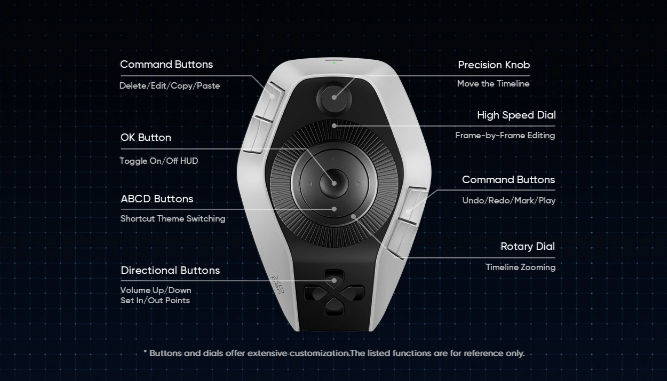
The XPPen Pilot Pro Editing Console is designed for creators who want full physical control over their editing workflow without constantly switching between keyboard and mouse. It combines precision hardware design with highly customizable input options, making it suitable for both professional and semi-professional editors.
One of its standout advantages is its multi-input control system, which includes customizable buttons, an all-way joystick, high-speed dials, and haptic feedback. These elements work together to give editors a more natural and immersive way to interact with timelines, effects, and transitions.
Key Features
· Customizable Buttons: Users can assign shortcuts for cutting, trimming, switching tools, or applying effects.
· All-Way Joystick Control: Provides precise timeline navigation and parameter adjustments.
· High-Speed Dials: Ideal for scrubbing through footage, adjusting audio levels, or fine-tuning color grading.
· Haptic Feedback: Delivers physical response for actions, helping reduce errors during fast editing.
· One-Hand Control Design: Allows editors to perform complex actions without interrupting keyboard use.
· Creative Workflow Support: Compatible with major editing software for flexible integration.
You can explore more details here:
XPPen Pilot Pro Editing Console
Pros
The biggest advantage of the Pilot Pro is its balance between precision and flexibility. The combination of joystick and dials allows extremely smooth timeline control, which is especially useful for long-form editing projects. Its customizable layout also means it can adapt to different editing styles, whether you are working on cinematic films, YouTube content, or commercial projects.
Another strength is its ergonomic design. The one-hand control system reduces repetitive strain and allows editors to maintain a faster rhythm without constantly moving their hand between devices.
Cons
However, the Pilot Pro may require an initial learning curve. Users who are new to editing consoles might need time to fully configure shortcuts and adapt to the control layout. Additionally, professionals who prefer extremely minimal setups might find the number of features slightly overwhelming at first.
Despite these minor drawbacks, it remains one of the most well-rounded editing consoles for 2026.
No.2 TourBox Elite
The TourBox Elite is a compact control console designed for creators who prioritize portability and precision. Unlike larger editing surfaces, it focuses on one-handed operation with a dense layout of buttons, knobs, and scroll controls.
Its biggest strength lies in its software adaptability. It works well with Adobe Premiere Pro, Photoshop, Lightroom, and DaVinci Resolve, making it a versatile tool for hybrid creators who switch between photo and video editing.
The TourBox Elite is especially popular among editors who value muscle memory. Once configured, the button layout becomes extremely efficient for repetitive tasks like trimming clips, switching tools, or applying presets.
Pros
· Extremely compact and portable
· High level of shortcut customization
· Excellent for multitasking across Adobe apps
· Strong tactile feedback for precise control
Cons
· Steeper learning curve for beginners
· Limited large-scale timeline navigation compared to joystick-based systems
· Less intuitive for users who prefer visual controls
No.3 Logitech MX Creative Console
The Logitech MX Creative Console focuses on productivity and ecosystem integration rather than deep cinematic editing control. It is designed for users who already work within Logitech’s ecosystem and want a streamlined experience across devices.
It provides a combination of tactile knobs and digital display controls, allowing users to manage editing tools, navigation, and system shortcuts in a clean interface. It is particularly appealing to content creators who value simplicity and reliability.
Pros
· Seamless integration with Logitech ecosystem
· Clean and modern interface
· Easy setup and user-friendly design
· Good for general creative productivity tasks
Cons
· Less specialized for professional video editing
· Limited deep timeline manipulation tools
· Not as customizable as high-end editing consoles
No.4 Loupedeck
Loupedeck is one of the most established names in the creative control surface industry. It is widely used by video editors, colorists, and streamers due to its strong integration with professional software like Adobe Premiere Pro, Final Cut Pro, and DaVinci Resolve.
Its standout feature is its focus on color grading and parameter control, making it especially popular among filmmakers and post-production specialists. The interface is highly visual, with dedicated dials and sliders for adjusting exposure, contrast, saturation, and more.
Pros
· Excellent for color grading workflows
· Deep integration with professional editing software
· High-quality build and responsive controls
· Widely adopted in professional environments
Cons
· Can be expensive compared to alternatives
· Less flexible for general-purpose editing
· Layout may feel complex for beginners
Conclusion
The best video editing console in 2026 ultimately depends on your workflow, software ecosystem, budget, and preferred control style. There is no single “perfect” device for everyone, but each option offers clear strengths depending on use case.
If you are looking for a highly flexible and powerful control surface that supports both precision editing and creative workflow efficiency, the XPPen Pilot Pro Editing Console stands out as one of the most balanced and forward-looking options. Its combination of joystick navigation, customizable controls, haptic feedback, and ergonomic design makes it especially suitable for modern content creation demands.
For users who prefer compact setups, the TourBox Elite is an excellent choice. For those who prioritize ecosystem simplicity, Logitech MX Creative Console offers a smooth entry point. Meanwhile, Loupedeck remains a strong professional-grade tool for color grading and studio-level production work.
Ultimately, your best choice comes down to how you edit—not just what you edit.